What’s Supported
Supported actions
This connector supports:- Read Actions, including full historic backfill.
- Write Actions.
- Proxy Actions, using the base URL
https://api.breakcold.com/rest.
Supported Objects
The Breakcold connector supports reading from the following objects: The Breakcold connector supports writing to the following objects:Example integration
For an example manifest file of a Breakcold integration, visit our samples repo on Github.Using the connector
This connector uses API Key authentication, so you do not need to configure a Provider App before getting started. (Provider Apps are only required for providers using the OAuth2 Authorization Code grant type.) To integrate with breakcold:- Create a manifest file similar to the example above.
- Deploy it using the amp CLI.
- Embed the InstallIntegration UI component, which will prompt the customer for an API key.
- Start using the connector!
- If your integration has Read Actions, you’ll start getting webhook messages.
- If your integration has Write Actions, you can start making API calls to our Write API.
- If your integration has Proxy Calls, you can start making Proxy API calls.
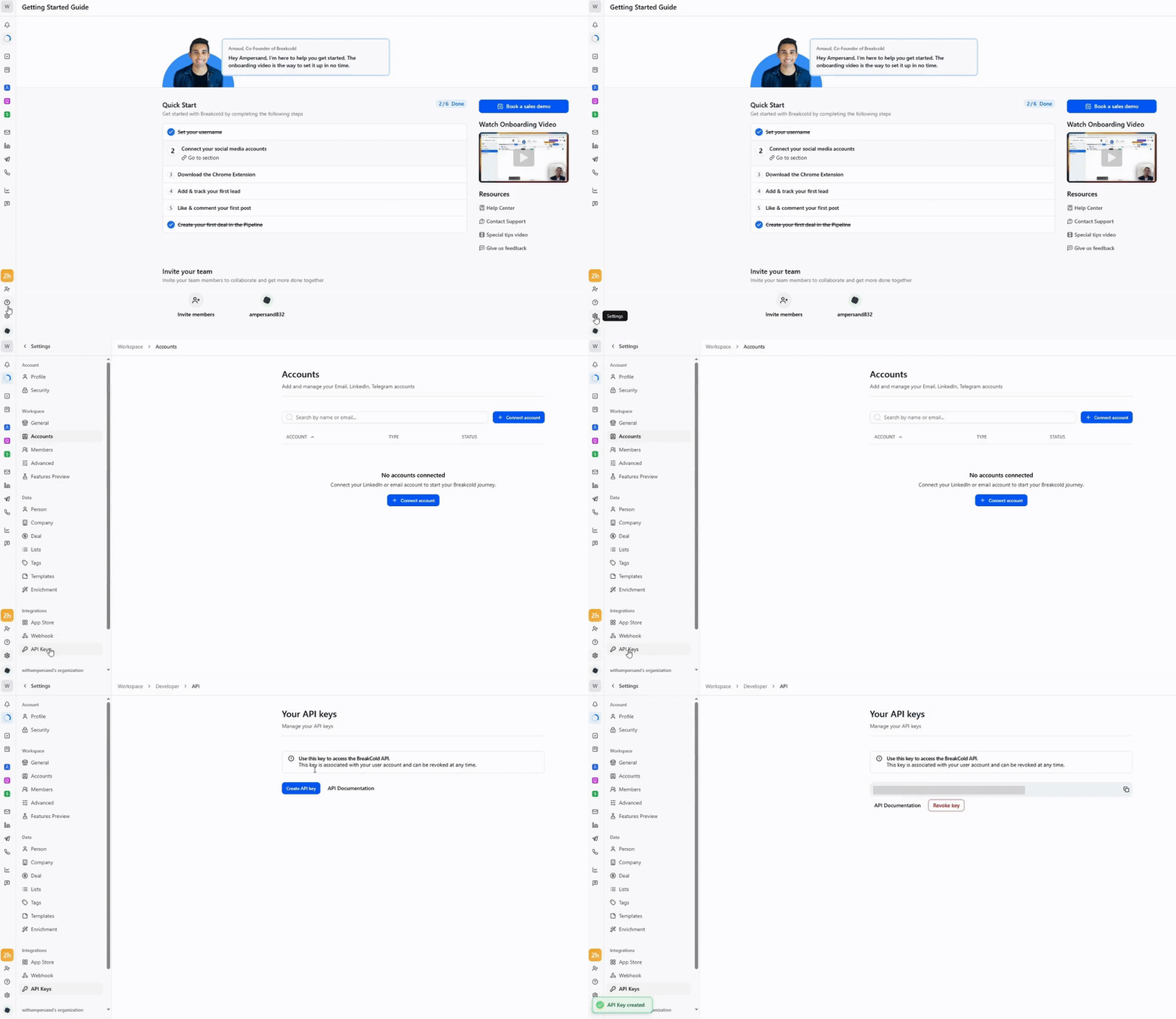
Creating an API key for Breakcold
- Log in to your Breakcold account.
- Click settings > API Keys > Create API key.