> ## Documentation Index
> Fetch the complete documentation index at: https://docs.ampersand.ai/llms.txt
> Use this file to discover all available pages before exploring further.

# Ramp

## What's supported

### Supported actions

This connector supports:

* [Read Actions](/read-actions), including full historic backfill. Incremental reading is supported for the objects marked in the table below, a full read of the Ramp instance will be done per scheduled read.
* [Write Actions](/write-actions).
* [Proxy Actions](/proxy-actions), using the base URL `https://api.ramp.com`.

### Supported objects

The Ramp connector supports the following objects:

export const rows = [{
  label: "accounting/accounts",
  read: true,
  write: false,
  incremental: false,
  href: "https://docs.ramp.com/developer-api/v1/api/accounting-gl-accounts"
}, {
  label: "accounting/fields",
  read: true,
  write: false,
  incremental: false,
  href: "https://docs.ramp.com/developer-api/v1/api/accounting"
}, {
  label: "accounting/vendors",
  read: true,
  write: false,
  incremental: false,
  href: "https://docs.ramp.com/developer-api/v1/api/accounting-vendors"
}, {
  label: "audit-logs/events",
  read: true,
  write: false,
  incremental: false,
  href: "https://docs.ramp.com/developer-api/v1/api/audit-logs"
}, {
  label: "bank-accounts",
  read: true,
  write: false,
  incremental: false,
  href: "https://docs.ramp.com/developer-api/v1/api/bank-accounts"
}, {
  label: "bills",
  read: true,
  write: true,
  incremental: true,
  href: "https://docs.ramp.com/developer-api/v1/api/bills"
}, {
  label: "bills/drafts",
  read: true,
  write: false,
  incremental: true,
  href: "https://docs.ramp.com/developer-api/v1/api/bills"
}, {
  label: "cards",
  read: true,
  write: "update only",
  incremental: false,
  href: "https://docs.ramp.com/developer-api/v1/cards-and-funds"
}, {
  label: "cashbacks",
  read: true,
  write: false,
  incremental: true,
  href: "https://docs.ramp.com/developer-api/v1/api/cashbacks"
}, {
  label: "departments",
  read: true,
  write: true,
  incremental: false,
  href: "https://docs.ramp.com/developer-api/v1/api/departments"
}, {
  label: "entities",
  read: true,
  write: false,
  incremental: false,
  href: "https://docs.ramp.com/developer-api/v1/api/entities"
}, {
  label: "item-receipts",
  read: true,
  write: "create only",
  incremental: false,
  href: "https://docs.ramp.com/developer-api/v1/api/item-receipts"
}, {
  label: "limits",
  read: true,
  write: false,
  incremental: true,
  href: "https://docs.ramp.com/developer-api/v1/api/funds"
}, {
  label: "locations",
  read: true,
  write: true,
  incremental: false,
  href: "https://docs.ramp.com/developer-api/v1/api/locations"
}, {
  label: "memos",
  read: true,
  write: false,
  incremental: true,
  href: "https://docs.ramp.com/developer-api/v1/api/memos"
}, {
  label: "merchants",
  read: true,
  write: false,
  incremental: false,
  href: "https://docs.ramp.com/developer-api/v1/api/merchants"
}, {
  label: "purchase-orders",
  read: true,
  write: true,
  incremental: true,
  href: "https://docs.ramp.com/developer-api/v1/api/purchase-orders"
}, {
  label: "receipts",
  read: true,
  write: "create only",
  incremental: true,
  href: "https://docs.ramp.com/developer-api/v1/api/receipts"
}, {
  label: "reimbursements",
  read: true,
  write: false,
  incremental: true,
  href: "https://docs.ramp.com/developer-api/v1/api/reimbursements"
}, {
  label: "repayments",
  read: true,
  write: false,
  incremental: true,
  href: "https://docs.ramp.com/developer-api/v1/api/repayments"
}, {
  label: "spend-programs",
  read: true,
  write: "create only",
  incremental: false,
  href: "https://docs.ramp.com/developer-api/v1/api/spend-programs"
}, {
  label: "statements",
  read: true,
  write: false,
  incremental: true,
  href: "https://docs.ramp.com/developer-api/v1/api/statements"
}, {
  label: "transactions",
  read: true,
  write: false,
  incremental: true,
  href: "https://docs.ramp.com/developer-api/v1/api/transactions"
}, {
  label: "transfers",
  read: true,
  write: false,
  incremental: true,
  href: "https://docs.ramp.com/developer-api/v1/api/transfers"
}, {
  label: "trips",
  read: true,
  write: false,
  incremental: true,
  href: "https://docs.ramp.com/developer-api/v1/api/trips"
}, {
  label: "users",
  read: true,
  write: "update only",
  incremental: false,
  href: "https://docs.ramp.com/developer-api/v1/api/users"
}, {
  label: "vendors",
  read: true,
  write: true,
  incremental: true,
  href: "https://docs.ramp.com/developer-api/v1/api/vendors"
}];

export const Check = () => <span>✅</span>;
export const Cross = () => <span>🚫</span>;
export const Partial = ({label}) => <span title={label}>✅*</span>;

export function renderCellValue(value) {
  if (typeof value === "boolean") {
    return value ? <Check /> : <Cross />;
  }
  if (typeof value === "string") {
    return <Partial label={value} />;
  }
  return value;
}

<div style={{width: '100%', overflowX: 'auto', display: 'block'}}>
  <table
    style={{
width: '100%',
minWidth: '100%',
tableLayout: 'fixed',
textAlign: 'center',
borderCollapse: 'collapse',
display: 'table'
}}
  >
    <thead style={{display: 'table-header-group', width: '100%'}}>
      <tr style={{display: 'table-row', width: '100%'}}>
        <th style={{textAlign: 'left', width: '40%'}}>Object</th>
        <th style={{width: '20%'}}>Read</th>
        <th style={{width: '20%'}}>Write</th>
        <th style={{width: '20%'}}>Incremental read</th>
      </tr>
    </thead>

    <tbody style={{display: 'table-row-group', width: '100%'}}>
      {[...rows]
                .sort((a, b) => a.label.localeCompare(b.label))
                .map((row) => (
                  <tr id={"row/" + row.label} key={row.label}>
                    <td style={{textAlign: "left"}}>
                      <a href={row.href}>{row.label}</a>
                    </td>
                    <td>{renderCellValue(row.read)}</td>
                    <td>{renderCellValue(row.write)}</td>
                    <td>{renderCellValue(row.incremental)}</td>
                  </tr>
                ))}
    </tbody>
  </table>
</div>

### Example integration

For an example manifest file of a Ramp integration, visit our [samples repo on GitHub](https://github.com/amp-labs/samples/blob/main/ramp/amp.yaml).

## Before you get started

To connect Ramp with Ampersand, you will need [a Ramp account](https://app.ramp.com).

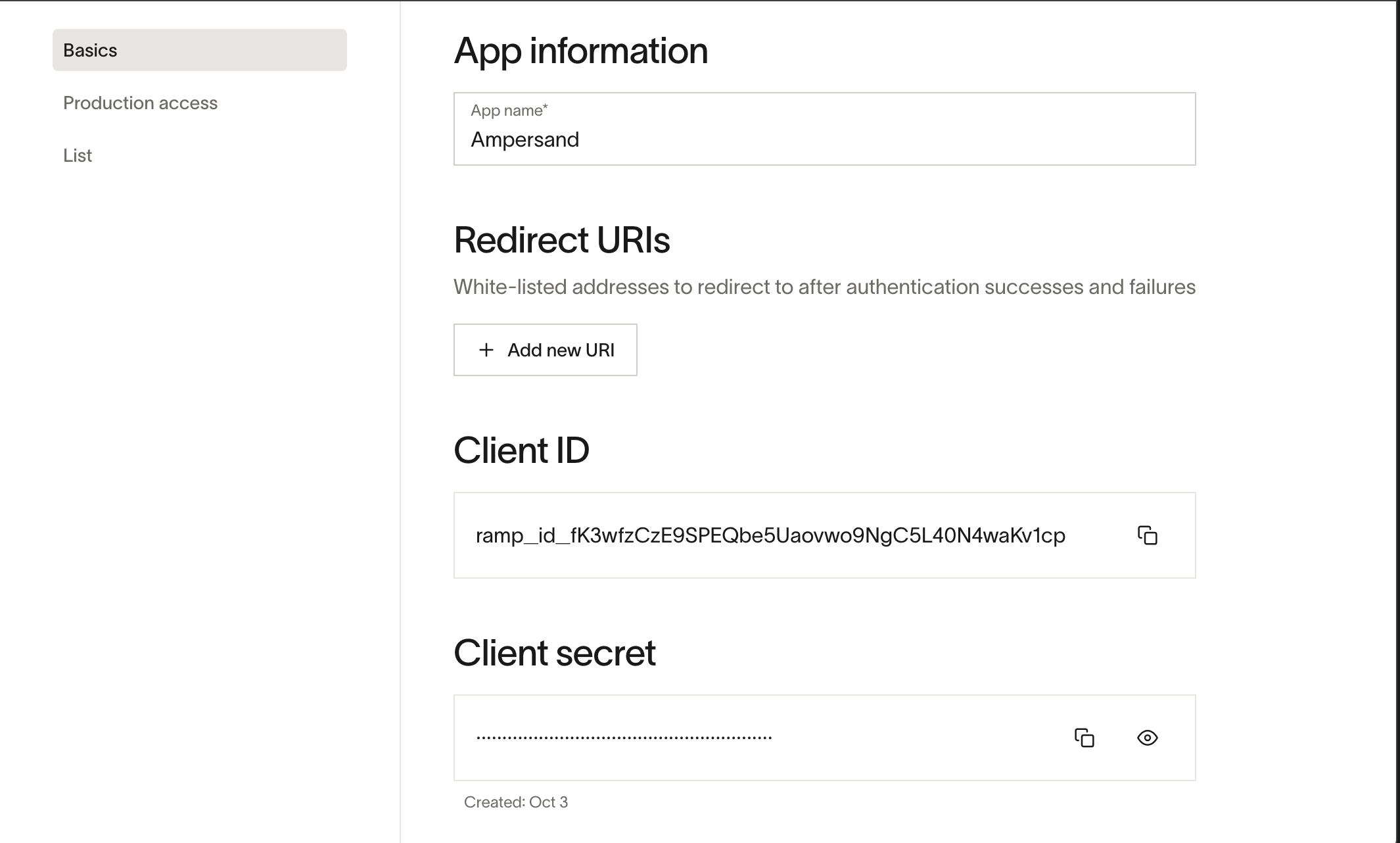
Once your account is created, you'll need to create an app in your Ramp portal, configure the app, and obtain the following credentials from your app:

* Client ID
* Client Secret
* Scopes

You will then use these credentials to connect your application to Ampersand.

### Create a Ramp account

To create an account for your organization, you need to apply here [Ramp Support](https://app.ramp.com/sign-up). An active account is required to log into your portal.

### Creating a Ramp app

Once your Ramp account is set up, you can follow the steps below to create a Ramp app:

1. Log in to your [Ramp Portal](https://app.ramp.com/sign-in).

2. Navigate to `https://app.ramp.com/ramp-developer`.

3. Click the **New app**.

4. Enter the following details to register your **Oauth** app:
   1. **App Name**: The name of your app.

5. Click the **Create App.**

6. Add **Redirect URIs**: `https://api.withampersand.com/callbacks/v1/oauth`

7. Select the scopes for your application. Ramp will authorize access to the selected scopes for your application. Make sure to select a scope for every object your integration reads from or writes to — for example, `transactions:read` for reading `transactions`, and `bills:write` for writing `bills`.

<img src="https://mintcdn.com/ampersand-24eb5c1a/wfnpxKZPjAQz4dQV/images/provider-guides/ramp-create-app.png?fit=max&auto=format&n=wfnpxKZPjAQz4dQV&q=85&s=51735ef60e932926d845e0f7d99e0a8e" alt="Ramp App Creation" width="2130" height="1282" data-path="images/provider-guides/ramp-create-app.png" />

You will find the **Client ID** and **Client Secret** in the app details. Note these credentials, as you will need them to connect your app to Ampersand.

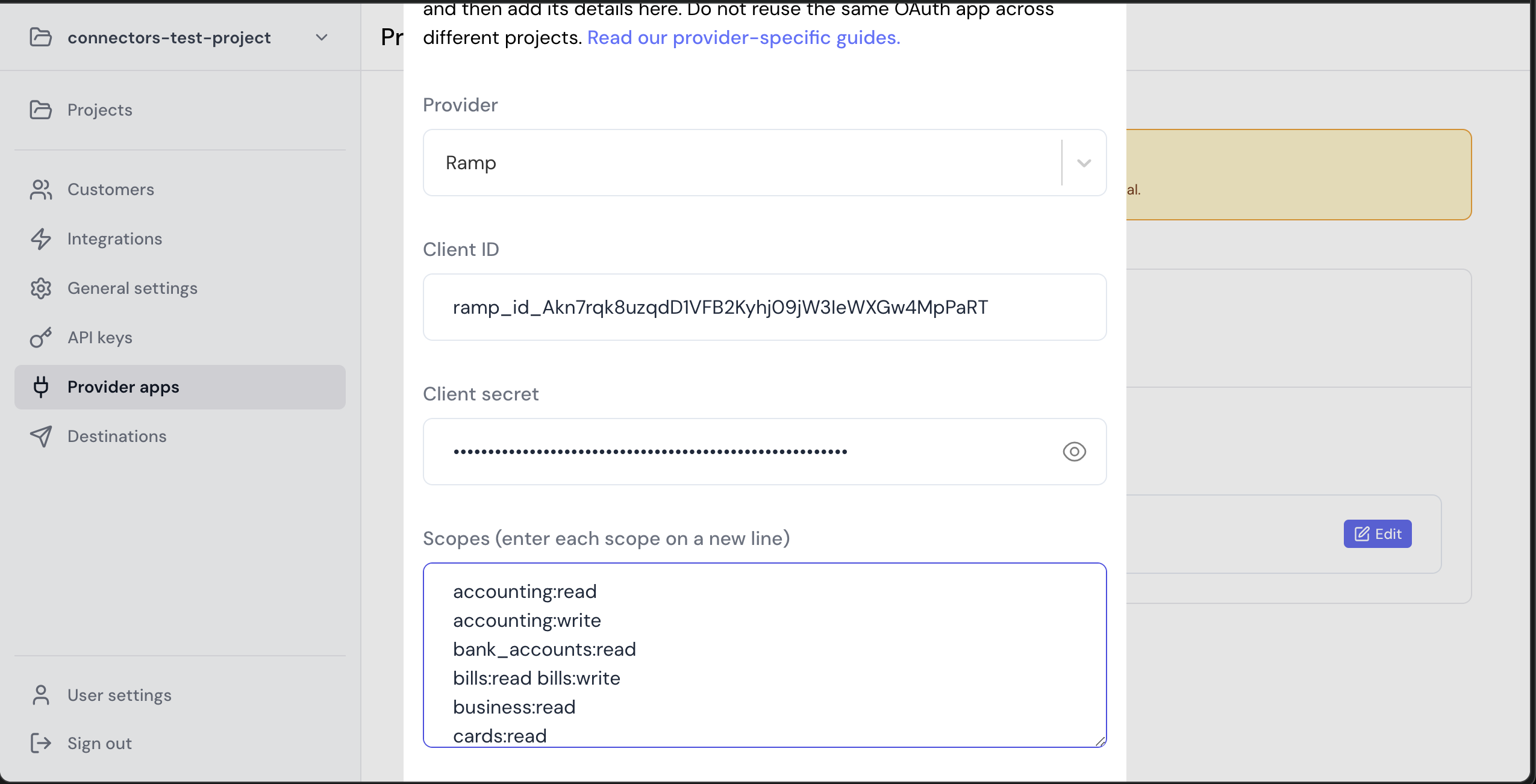
### Add your Ramp app info to Ampersand

1. Log in to your [Ampersand Dashboard](https://dashboard.withampersand.com).

2. Select the project where you want to create a Ramp integration.

   <img src="https://mintcdn.com/ampersand-24eb5c1a/Bx3tggG51e0liOp-/images/provider-guides/31a6a12-Ampersand.png?fit=max&auto=format&n=Bx3tggG51e0liOp-&q=85&s=7ebd893fd2a976ebe7cf8af53f8581b8" alt="Ampersand Project Selection" width="2244" height="442" data-path="images/provider-guides/31a6a12-Ampersand.png" />

3. Select **Provider Apps**.

4. Select **Ramp** from the **Provider** list.

5. Enter the previously obtained **Client ID** in the **Client ID** field and the **Client Secret** in the **Client Secret** field.

6. Enter the scopes set for your application in *Ramp*.
   <img src="https://mintcdn.com/ampersand-24eb5c1a/wfnpxKZPjAQz4dQV/images/provider-guides/ramp-add-app.png?fit=max&auto=format&n=wfnpxKZPjAQz4dQV&q=85&s=cfeb3640a3e12832c90221b10238f84c" alt="Ampersand Integration" width="2550" height="1302" data-path="images/provider-guides/ramp-add-app.png" />

## Using the connector

To start integrating with Ramp:

* Create a manifest file like the [example above](#example-integration).
* Deploy it using the [amp CLI](/cli/overview).
* If you are using Read Actions, create a [destination](/destinations).
* Embed the [InstallIntegration](/embeddable-ui-components#install-integration) UI component. The UI component will prompt the customer for OAuth authorization.
* Start using the connector!
  * If your integration has [Read Actions](/read-actions), you'll start getting webhook messages.
  * If your integration has [Write Actions](/write-actions), you can start making API calls to our Write API.
  * If your integration has [Proxy Actions](/proxy-actions), you can start making Proxy API calls.


This documentation is built and hosted on [Mintlify](https://mintlify.com), a developer documentation platform.